
Last updated on
Nov 7, 2026

CA LACIV 137 2018-2026 free printable template
pdfFiller is not affiliated with any government organization

Fill out
Complete the form online in a simple drag-and-drop editor.

eSign
Add your legally binding signature or send the form for signing.

Share
Share the form via a link, letting anyone fill it out from any device.

Export
Download, print, email, or move the form to your cloud storage.
Why pdfFiller is the best tool for your documents and forms


End-to-end document management
From editing and signing to collaboration and tracking, pdfFiller has everything you need to get your documents done quickly and efficiently.
Accessible from anywhere
pdfFiller is fully cloud-based. This means you can edit, sign, and share documents from anywhere using your computer, smartphone, or tablet.
Secure and compliant
pdfFiller lets you securely manage documents following global laws like ESIGN, CCPA, and GDPR. It's also HIPAA and SOC 2 compliant.
What is CA LACIV 137
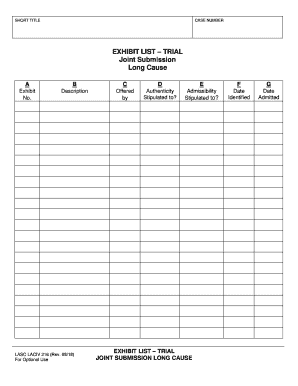
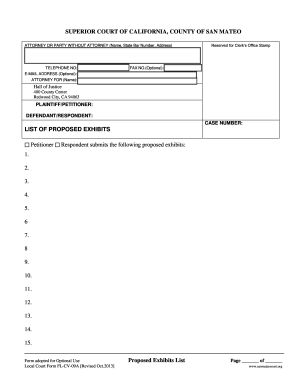
The Exhibit List Form (LASC LACIV 137) is a legal document used by parties in California court cases to organize and present exhibits as evidence.
pdfFiller scores top ratings on review platforms




efficient and easy to use. Convenient too!
I made a request and it was promptly…
I made a request and it was promptly taken care of!!Very thankful
Who needs CA LACIV 137?
Explore how professionals across industries use pdfFiller.

CA LACIV 137 is needed by:
-
Plaintiffs in court cases
-
Defendants in legal proceedings
-
Lawyers handling California cases
-
Legal assistants preparing court documents
-
Individuals filing legal claims
Comprehensive Guide to CA LACIV 137
What is the Exhibit List Form?
The Exhibit List Form (LASC LACIV 137) is a critical legal document utilized in California courts. This form serves to list and provide detailed descriptions of evidence pertinent to court cases. Plaintiffs and defendants can use this form to organize and describe their evidence, ensuring clarity in submissions. Notably, the Exhibit List Form is intended for optional use in legal proceedings, aiding individuals in effectively presenting their cases.
Purpose and Benefits of the Exhibit List Form
The Exhibit List Form plays a vital role in enhancing courtroom efficiency. By organizing evidence systematically, it not only facilitates clarity but also contributes to a more professional presentation. This structure makes it easier for judges and juries to follow the case, ultimately supporting the legal arguments being made. Utilizing this form can lead to improved outcomes by ensuring that all necessary evidence is clearly documented.
Key Features of the Exhibit List Form
The Exhibit List Form includes various features designed to simplify its use. Users will find blank fields that allow for the input of exhibit numbers, IDs, and descriptions, which help maintain organized evidence documentation. Optional guidance is embedded within the form to assist users in completing it accurately. The simple design enhances usability, making it accessible even for those unfamiliar with legal documents.
Who Should Use the Exhibit List Form?
This form is essential for a range of individuals involved in legal matters. Primarily, plaintiffs and defendants benefit from its use, as do their legal representatives. There are various scenarios where the Exhibit List Form becomes necessary, such as during civil litigation or in preparation for trials. Individuals engaged in California's legal proceedings should consider using this form to ensure compliance and clarity in evidence presentation.
How to Fill Out the Exhibit List Form Online
Filling out the Exhibit List Form online is a straightforward process when using pdfFiller. Follow these steps for efficient completion:
-
Access the Exhibit List Form on pdfFiller's platform.
-
Begin entering information into the designated fields, including exhibit numbers and descriptions.
-
Refer to the provided guidance for any questions or uncertainties.
-
Before finalizing, carefully review all entered details for accuracy.
To avoid common mistakes, ensure that every section is fully filled, including necessary signatures where applicable.
Submission Methods for the Exhibit List Form
Once completed, the Exhibit List Form must be submitted to the appropriate court. There are several submission methods available:
-
Online submission through the court's electronic filing system.
-
In-person delivery to the court clerk's office.
-
Mailing the form to the court's designated address.
It is crucial to adhere to any deadlines for submission and be aware of potential filing fees. Keeping track of submission confirmation details is also important to ensure your evidence is properly recorded.
Common Errors and How to Avoid Them
Avoiding common pitfalls when completing the Exhibit List Form can save time and resources. Frequent mistakes include:
-
Leaving sections incomplete or blank.
-
Failing to provide required signatures.
-
Inaccurate exhibit descriptions that could hinder clarity.
To eliminate these errors, diligently review the completed form before submission and cross-check it against the guidelines provided.
Security and Compliance for the Exhibit List Form
When handling the Exhibit List Form, security and compliance are paramount. pdfFiller employs robust security measures to protect users' data:
-
256-bit encryption for data protection.
-
Compliance with SOC 2 Type II, HIPAA, and GDPR regulations.
It is vital to treat sensitive legal documents with care, ensuring that all data is secure throughout the filing process.
How to Download and Save the Exhibit List Form
After filling out the Exhibit List Form, users can readily obtain a copy for their records. To download the completed form:
-
Locate the download option on pdfFiller's interface.
-
Select to download the filled form as a PDF.
-
Choose options for saving or printing the document based on your requirements.
Effective file management and organization of legal documents are recommended to ensure accessibility in the future.
Get Started with pdfFiller for Your Exhibit List Form Needs
Using pdfFiller for managing the Exhibit List Form offers numerous advantages. This platform provides an easy-to-navigate interface, cloud access, and comprehensive editing tools, making the form-filling process efficient. Additionally, relying on secure software ensures that your sensitive legal documents are handled with utmost care and professionalism.
How to fill out the CA LACIV 137
-
1.To access the Exhibit List Form on pdfFiller, visit the platform's website and use the search feature to find the specific form by name or form number. Once you locate the form, click on it to open it in the editor.
-
2.Navigate through the form’s fields using your mouse or keyboard. Click on the blanks to input exhibit numbers, IDs, and descriptions pertinent to your case. Ensure you have all necessary information before you start filling out the form to streamline the process.
-
3.Prior to filling out the form, gather all relevant information, including the details of your exhibits such as their numbers, IDs, and descriptions. Having this information ready will make completing the form smoother and more efficient.
-
4.Review the completed form thoroughly in pdfFiller. Ensure that all fields are filled accurately and completely. Double-check your exhibit details to avoid any errors or omissions that could affect your case.
-
5.Once you have finalized the form, click on the save button in pdfFiller to store your work. You can also download the document to your device or submit it directly through pdfFiller, depending on court requirements.

Who is eligible to use the Exhibit List Form?
The Exhibit List Form can be used by any party involved in a legal case in California, including plaintiffs, defendants, and their legal representatives. It is intended for organizing exhibits crucial to case proceedings.
Are there any deadlines associated with submitting this form?
While the Exhibit List Form itself does not have a specific deadline, it is important to submit it in accordance with your case's schedule. Be aware of any deadlines set by the court to avoid complications in your proceedings.
What methods are available for submitting the Exhibit List Form?
You can submit the Exhibit List Form by filing it directly with the relevant California court. Depending on the court’s rules, you may also be able to submit electronically through their online system if it is available.
What supporting documents are required with this form?
Typically, you need to include supporting documents related to the exhibits listed, such as photographs, documents, or other items pertinent to your case. Always check the specific court's guidelines for any additional requirements.
What common mistakes should I avoid when filling out this form?
Common mistakes to avoid include leaving fields blank, incorrect numbering of exhibits, and failing to provide accurate descriptions. Ensure all information is precise and corresponds to your supporting evidence.
How long does it take for the court to process the Exhibit List Form?
Processing times can vary depending on the court's workload and procedures. Generally, expect a few days to a couple of weeks for your form to be processed and entered into the case record.
What if I need help completing the Exhbit List Form?
If you need assistance, consider reaching out to a legal professional or utilizing online resources such as legal aid organizations. You can also consult with court staff if you have questions about specific requirements.
CA LACIV 137 Form Versions
Related Forms





Get the latest insights from our blog


If you believe that this page should be taken down, please follow our DMCA take down process
here
.
This form may include fields for payment information. Data entered in these fields is not covered by PCI DSS compliance.